A year ago, our co-founder Matt built a browser-based game. He has a PhD in Educational Foundations. He has never written a for-loop. And he built a browser-based game. That’s vibe coding.
The term was coined by Andrej Karpathy, a co-founder of OpenAI, in February 2025. His description: a new kind of coding where you “fully give in to the vibes, embrace exponentials, and forget that the code even exists.” Collins English Dictionary named it their Word of the Year for 2025. Merriam-Webster added it to their slang and trending list.
Big moment for a term that describes something pretty simple: you tell the AI what you want to build. The AI builds it. You look at what it made, tell it what to change, and keep going until you have the thing you wanted.
What vibe coding actually is
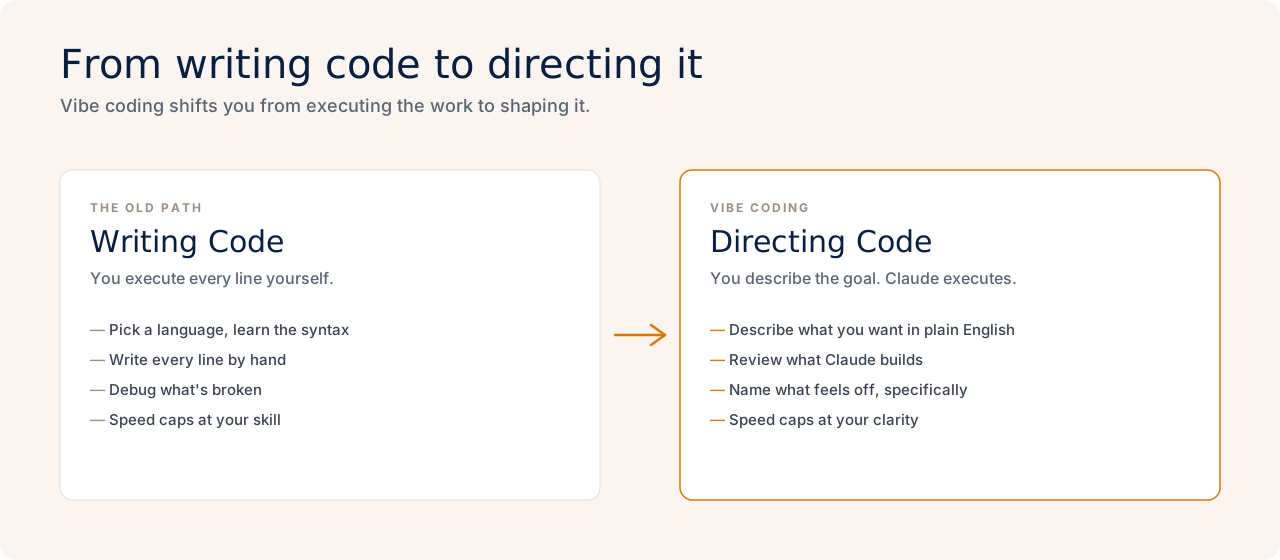
Vibe coding is a conversational approach to software development. Instead of writing code line by line in a programming language, you describe your goal in plain English, review what the AI produces, give feedback, and iterate.
You’re not writing code. You’re directing it. The mental model is closer to managing a project than writing a program. You bring the goal, the context, and the judgment. Claude, or whatever AI you’re using, brings the technical execution.
Vibe coding is a strategic, managerial skill
Even before AI, many very intelligent people have brought software to market without writing a line of code. Product managers were the closest thing to vibe coders in the pre-AI era, they just had a team of engineers rather than an LLM to work with. But the skill and practice are the same: be clear about what your team is building, be judgmental in what you choose to build, listen to your users when it comes to feature development…all very important and valuable skills!
At the end of the day, vibe coding is a practiced skill like any other, and it still follows the same fundamental principle of all business processes: garbage in, garbage out. You have to take the time to provide solid input to get a good result.
The AI doesn’t read your mind. Vague instructions produce vague results, and the professionals who get the most out of vibe coding are the ones who learn to describe what they want clearly and evaluate what they get honestly. Steering the conversation when things go sideways is part of the job.
Our non-technical community members use vibe coding to build internal dashboards, automate reporting workflows, create client-facing tools, and replace spreadsheets they’ve been maintaining manually for years. When it comes to internal tools, especially the growing practice of “software for one,” vibe coding can produce effective tools at lightning speed.
Why this is different from “just using AI”
When you use Claude or ChatGPT to write an email or summarize a document, the output lives in the chat window. You copy it out, paste it somewhere, done.
Vibe coding is different because the output is software. It runs. Other people can use it. You can deploy it to the internet (meaning publish it so anyone can access it from a browser). The thing you made has a life outside the chat window.
That shift matters. It means non-technical professionals can now build tools they previously had to request from engineering teams, buy off the shelf (often imperfectly), or do without entirely.
Once you can share your vibe-coded tool with your team and they say “let’s start using this,” that’s the turning point that makes vibe coding feel meaningful beyond hobby projects. That moment when someone else is using the thing you made changes how you think about what you’re capable of.
What tools do people use?
The most common setup in MVP Club is Claude Code, Anthropic’s coding-focused AI. You can run it as a desktop app or through a terminal (a text-based command window, like a chat interface for your computer). The conversation works the same either way: you describe what you want, Claude asks clarifying questions, builds the files, and shows you the result.
Don’t let the name “Claude Code” fool you: Claude is the one doing the coding, and you’re the manager telling it what to create.
A few other tools people use:
- Lovable or Base44: browser-based, good for beginners who want to see visual results quickly
- ChatGPT Codex: popular with people building more complex projects, requires more tenacity and curiosity to interact with your project directly
- Claude Code desktop app: a good middle ground if the terminal feels intimidating
The right tool depends on what you’re building and how you like to work. Most people in our community start with Claude Code because it’s what we use in our weekly building sessions and there’s always someone around to help when you get stuck.
There’s sometimes a mysterious layer of vibe coding projects, where you as the creator might not be able to articulate “what” the app is. You just see it running in your browser when Claude tells you the app is running.
It’s definitely worth taking some time conversing with Claude about “what” you actually built and how it can be used or shared by others. Yes, you built an app: what are the pieces of the tech stack? It’s worth learning the high-level components and a bit of the jargon, even if you’re not the one writing the code. “How do I deploy an express app to google cloud” is a much clearer and actionable next step question than “How do I get this out there?”
The skill that actually matters
When I coach people through their first vibe coding project, the thing that trips them up almost never involves code. It involves description and planning.
“Make it look nicer” is not actionable feedback for Claude. “The button colors feel too bold, and the section headings are harder to read than I’d like” gives Claude something to work with. The more specific you are about what you want and what you see, the faster you get there.
A few things that help in practice:
- Start with a clear goal, not a list of features. “I want a tool that lets me log client check-ins without opening a spreadsheet” is better than “I want a database with a form.”
- Tell the LLM to ask you clarifying questions to refine your goal into a workable plan, often a PRD (Product Requirements Document).
- Review what it plans and make adjustments. Vibe coding works in iterations. Approve what’s working, fix what isn’t, then move forward.
- Keep a project notes file. An LLM doesn’t remember previous conversations. A short document summarizing what you’ve built and what’s next keeps things coherent across sessions.
Who should try this
The short answer: anyone who has ever thought “I wish there was a tool that did X” and assumed they couldn’t build it. Even if you’re not the one who ultimately builds a thing, a vibe coded demo is much farther along as a prototype than a few sketches and an ideas document!
You don’t need a technical background. The barrier to starting is now lower than the barrier to learning Excel was fifteen years ago. What used to require years of training or a hefty engineering contract now requires a $20/month Claude subscription and an afternoon.
What you need are a clear goal, an ability to evaluate what’s working and articulate what isn’t, and the tenacity to stick with the continuous cycle of refinement until you’ve gotten what you want.
The real reason this matters
Most professionals have been constrained by the software that exists. You work inside tools someone else built, with features someone else decided you needed, within workflows someone else designed. If you needed something different, you either adapted or requested it and waited.
Vibe coding changes that constraint. The question stops being “does a tool exist for this?” and starts being “what do I want to build?”
That’s a genuinely new question for most people. It takes some getting used to. But once you’ve experienced the moment where something you described in a conversation becomes a working thing that other people can use, it’s hard to go back to assuming you couldn’t.
If you want to see what this looks like in practice alongside other professionals who are figuring it out in real time, that’s exactly what happens in MVP Club’s weekly building sessions. Come join us.